> For the complete documentation index, see [llms.txt](https://lwin-moe-paing.gitbook.io/typescript-baby-by-lwin-moe-paing/llms.txt). Markdown versions of documentation pages are available by appending `.md` to page URLs; this page is available as [Markdown](https://lwin-moe-paing.gitbook.io/typescript-baby-by-lwin-moe-paing/basic-typescript/ts-array.md).
# TS - Array
 `let data: number[] = [1, 2, 3];` ရေးထုံးနဲ့ Numbre Type Array ကို ရေးသားနိုင်ပါတယ် ။
လေးထောင့်ကွင်း အဖွင့်အပိတ် `[]` ရဲ့အရှေ့မှာ Type တန်ဖိုးကို သတ်မှတ်ပေးရုံပါ ။
`let data: number[] = [1, 2, 3];` ရေးထုံးနဲ့ Numbre Type Array ကို ရေးသားနိုင်ပါတယ် ။
လေးထောင့်ကွင်း အဖွင့်အပိတ် `[]` ရဲ့အရှေ့မှာ Type တန်ဖိုးကို သတ်မှတ်ပေးရုံပါ ။
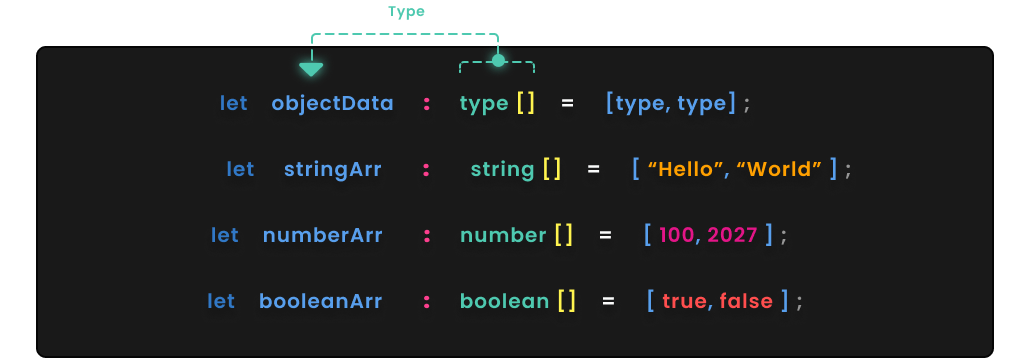 မိမိစက်ထဲမှာ `type` တွေပြောင်းလဲ သတ်မှတ်ပြီး ရေးသာနိုင်ပါတယ် ။ ထူးခြားသွားမှာက လက်ခံရလိုက်တဲ့ variable နောက်မှာ dot `(.)` ရိုက်လိုက်တာနဲ့ TypeScript Server ကနေ push, shift အစရှိတဲ့ array methods တွေကို Feedback ပေးလာမှာဖြစ်ပါတယ် ။
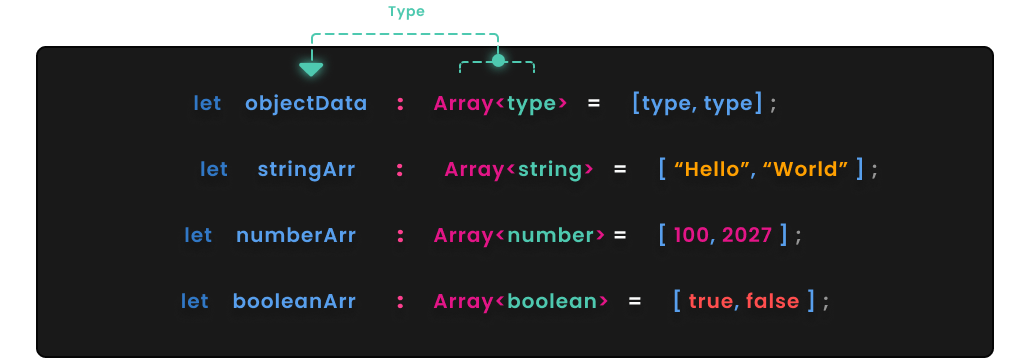 နောက်တစ်နည်းနဲ့ ရေးသားနိုင်ပါသေးတယ် ။
Array ရဲ့နောက်မှာ Less-than Sign `<` နဲ့ Greater-than Sign `>` ကြားမှာ Type ထည့်သွင်း ရေးသားနည်းပါ ။
နောက်တစ်နည်းနဲ့ ရေးသားနိုင်ပါသေးတယ် ။
Array ရဲ့နောက်မှာ Less-than Sign `<` နဲ့ Greater-than Sign `>` ကြားမှာ Type ထည့်သွင်း ရေးသားနည်းပါ ။